While delivery is one of the most powerful ways to increase restaurant sales and reach new customers. Adding delivery raises real questions: Do you hire drivers or partner with a platform? How do you protect margins when commissions eat into already-thin profits? Which of the competing platforms, each with different fee structures, truly fits your volume and budget? And how much do you really need to spend upfront on equipment, technology, staff training, and menu changes before you can take your first order?
This guide answers all of it. You'll compare in-house, third-party, and hybrid models so you can choose the right fit for your operation. You'll also see five clear steps to launch on DoorDash Marketplace, optimize your menu, manage costs, and keep operations running smoothly once you're live.
Why restaurant delivery is no longer optional
The National Restaurant Association's 2025 trend report uncovered something revealing: nearly 75% of all restaurant traffic now happens off-premises. That's almost 3 out of 4 orders taken to go. Among Gen Z and millennials, roughly two-thirds consider takeout a regular part of how they live, and more than 60% say they're ordering to-go more frequently than they were a year ago.
The same report found that delivery and takeout now account for a larger share of sales for 58% of limited-service operators and 41% of full-service operators compared to 2019.
At least 60% of U.S. consumers place a delivery or takeout order weekly, and nearly a third do so through third-party platforms at least twice a week. Customers have built delivery into their routines, and they tend to choose restaurants that fit them.
Choose your delivery model: in-house, third-party, or hybrid
Before your first delivery order goes out, you need to answer one foundational question: who handles the drivers and delivery operations? Whatever you choose will directly impact your costs, your customer experience, and your speed to launch.
There are three delivery models to consider, and the right one depends on a few factors: your order volume, budget, and how much you want to manage directly.
In-house delivery: maximum control, maximum investment
When comparing in-house with third-delivery and beyond, the main difference is that with in-house, you own the entire experience. You hire and manage delivery drivers, handle insurance and vehicle costs, and set up the systems to dispatch and track orders. Customers interact with your brand from the moment they place an order to the moment their food arrives.
You also keep 100% of your delivery revenue, with no commission fees going to a third-party platform.
What that control asks of you:
Hiring, scheduling, and managing delivery drivers
Covering vehicle insurance and related liability costs
Building systems to dispatch and track orders in real time
A dedicated delivery manager to oversee daily operations
Absorbing fixed costs that don't scale down on slow nights
Who it's for: Restaurant owners with strong, consistent local demand, at least $750k in annual revenue, and the operational bandwidth to support a dedicated delivery staff.
Third-party platforms: instant access, predictable costs
With a third-party delivery service, skip the part that requires you to hire drivers and build your own delivery operations. Instead of upfront investment, you'll pay a per-order commission fee (often 15–30%) while the platform handles driver recruitment, routing, and the customer-facing side of the delivery process. You also gain immediate access to a large customer base already using delivery apps to find and order food.
One tradeoff: on most third-party platforms, customer data stays with the platform rather than flowing directly to you. Keep that in mind as you think about building repeat customers over time.
With a platform like DoorDash Marketplace, you get:
Access to millions of customers already browsing for food delivery
A built-in driver network with no recruiting or scheduling on your end
DashPass members who order frequently and return to restaurants they trust
Real-time Merchant Portal data on sales, ratings, and order trends
Who it's for: Small-to-medium restaurant owners testing delivery for the first time. For most independents, especially those operating on an annual revenue of $300k or less, third-party platforms are often the fastest and lowest-risk path to your first delivery order.
Hybrid approach: flexibility and optimization
A hybrid model combines third-party delivery platforms with an in-house driver operation. For example, you might use DoorDash Marketplace to cover peak hours or a wider delivery radius. Then, you'll use your own drivers within a defined local zone where tighter control over food quality and the ordering experience is most critical.
Who it's for: This approach works best for restaurants that already have delivery experience, typically those operating somewhere in the $300k–$750k annual revenue range — though the right threshold varies by market, concept type, and overhead structure. It requires a clear picture of delivery performance before layering in the complexity of managing drivers directly. For most restaurant owners just getting started, building volume on a third-party platform first is the better move.
FYI: For restaurant owners who want a little bit of both, DoorDash offers a Self-Delivery option, which lets you use your own drivers while still reaching DoorDash's customer base through Marketplace.

How to set up delivery on DoorDash Marketplace in 5 steps
So you've chosen DoorDash Marketplace as your third-party delivery model. If you move quickly, your delivery system could be up and running in just 3–5 days. Here's the exact process.
Step 1: Sign up and activate your account
Head to the DoorDash Merchant signup page and enter your restaurant's basic information: business name, address, phone number, and ownership details. You'll connect your bank account for payouts and select a commission plan before submitting your application.
Have the following ready before you start:
Business license and tax ID
Bank account information for direct deposit
Hours of operation
A high-quality photo of your restaurant or logo
Once DoorDash approves your application, you'll receive access to the Merchant Portal, where you'll manage your menu, orders, and performance data.
Step 2: Set up your menu and pricing
Build your delivery menu carefully, since it's the first thing potential customers see. Write clear descriptions, organize items into logical categories, and add photos. Listings with photos consistently drive higher order volume, so prioritize images for your top menu items.
The menu optimization section below covers item selection, food delivery packaging principles, and margin analysis in full detail.
Step 3: Configure your delivery settings
In the Merchant Portal, set your delivery radius, delivery hours, and prep time estimates. Your delivery hours may differ from your dine-in hours, something to think about before you go live. Start prep time estimates conservatively and adjust from there. You can also pause incoming delivery orders directly from the Merchant Portal during a rush.
Step 4: Train your team on tablet management
Orders come in through your DoorDash tablet, and your team confirms them, prints tickets, and manages the queue. If you use a POS system, check whether it integrates directly with DoorDash. The day-to-day operations section below covers live order flow and team training in detail.
Step 5: Test with a limited launch before going fully live
Before opening up to your full customer base, run a soft launch. Pull back your delivery radius, limit your menu to your most reliable dishes, and run a few test orders through the system yourself.
Use the pilot phase to:
Confirm your prep time estimates hold up under real order volume
Test whether your packaging keeps food quality intact in transit
Catch any tablet or POS system issues before they affect real customers
Identify gaps in your pickup area setup before volume scales
Once the delivery process runs smoothly from kitchen to door, expand your radius and restore your full delivery menu.
Optimize your menu for delivery revenue
Build around dishes that travel well
Before adding any dish to your delivery menu, consider transport first. Will it arrive in good condition without any intervention from your team? If the answer is uncertain, leave it off for now.
Dishes that tend to travel well:
Braised proteins, curries, and stews that hold heat and texture
Rice and grain-based dishes that stay intact during transport
Sandwiches and wraps with sauces packed separately
Dishes to reconsider:
Fried items that go soggy within minutes of leaving the kitchen
Anything requiring tableside finishing or assembly
Cuisine-specific guidance helps here. Pad Thai and curry are reliable delivery options for a Thai restaurant; papaya salad arrives wilted. Tacos travel better than burritos. Pizza holds up far better than most pasta dishes. Know your menu's weaknesses before your customers discover them.
Do the margin math before you publish your menu
A dish that's a strong seller in your dining room can become a margin killer once platform commission fees are factored in. Before you go live, calculate the true profitability of each menu item after commission.
Use photos and upsells to drive higher order value
When building out your delivery menu:
Add high-quality photos to every menu item, starting with your top sellers
Write descriptions that highlight flavor and key ingredients
Design for higher ticket sizes by building in upsell prompts for drinks, sides, and desserts, and grouping items into meal deals or bundles at checkout
Essential delivery equipment and setup
Missing bags, spilled soups, confused drivers circling your entrance — most early delivery problems trace back to gaps in equipment and setup, not the food itself. Here's what to have in place before your first order goes out.
Kitchen and prep area
Stock your prep area with:
Insulated bags that keep hot and cold items at the right temperature during transit
Leak-proof, ventilated containers that prevent sogginess without trapping steam
Tamper-evident seals on every order to build customer trust and reduce disputes
Separate containers for sauces and dressings so they don't soak into the rest of the order
Drink carriers for beverages that need to travel upright
Pickup station setup
A dedicated pickup area keeps drivers from interrupting dine-in service to track down orders.
Set yours up with:
A designated shelf or counter clearly marked for delivery orders only
An organization system sorted by pickup time or order number
A stock of to-go bags, napkins, utensils, and condiment packets
Tamper-evident stickers for sealing bags before handoff
Driver equipment: in-house delivery only
On Marketplace and Self-Delivery, Dashers bring their own gear.
Driver equipment is only your responsibility with fully in-house delivery:
Insulated delivery bags sized for full orders
Vehicle signage to identify drivers on the road
A phone mount and data plan for navigation and order updates
Market your delivery offering to customers
Turning delivery on is the easy part. Filling your order queue takes a little more intention. The good news: you already have more marketing opportunities than you think.
In-platform promotion: DoorDash tools
DashPass promotions: DashPass members order often and respond well to deals. Enrolling puts your restaurant in front of a high-intent customer segment actively looking for places to order from.
Featured placement: Appear higher in search results and category listings within the DoorDash app, increasing exposure to customers browsing your area.
Sponsored listings: Merchants have the option of pay‑per‑order ads which will give your restaurant prime placement on DoorDash.
First-order discounts: A small discount for customers ordering from you for the first time on DoorDash can turn a browser into a repeat customer.
Own-channel marketing
Your existing customers are your fastest path to early delivery orders. Put your delivery option in front of them across every channel you already own:
Add an ordering button or delivery banner to your restaurant website
Update your Google Business profile with delivery hours and your ordering link
Post on Instagram and Facebook with a direct link to your DoorDash Marketplace page
Email your customer list with a specific offer tied to your delivery launch
Put physical signage inside your restaurant and window stickers at your entrance for dine-in guests and foot traffic
Run geotargeted social ads to reach new customers within your delivery radius
Use SMS to reach customers directly if you've collected phone numbers through Storefront or your POS system
Launch incentives
Promotions during a launch period can drive a 20-30% lift in order volume, making the opening weeks a smart time to invest in offers. A few that tend to work well:
Introductory discount: Something like $5 off a $15+ order lowers the barrier for customers placing their first delivery order with you.
Waived delivery fees: Removing the delivery fee during your first week encourages trial without requiring a large discount on food.
Delivery-only specials: A limited-time item or bundle exclusive to your delivery menu creates a reason to order that dine-in guests don't get.
How to create online ordering for your restaurant
Once you've chosen your delivery model, here's how online ordering gets configured across each channel.
DoorDash Marketplace as your online ordering platform
Once your Marketplace account is live, your restaurant appears in the DoorDash app, and customers can place orders immediately.
Direct online ordering with DoorDash Storefront
Storefront is configured through your Merchant Portal. Once enabled, DoorDash generates a branded ordering page on your own domain. To go live, you'll need to:
Add the ordering link or button to your restaurant website
Connect it to your social media pages and Google Business profile
Confirm your menu, hours, and pricing are accurate before launch
Customer contact information from Storefront orders stays with you for direct marketing, unlike Marketplace orders, where that data remains with the platform.
Integrating online ordering into your existing website
Embedding ordering directly into your existing website requires a few additional steps:
Confirm your POS system integrates with your chosen online delivery ordering platform
Embed the ordering widget using the provided code snippet
Configure payment processing and test the checkout flow across desktop and mobile
Sync your online menu with your in-house menu, so updates carry across both
This path requires more technical work than the other two. If website configuration feels outside your wheelhouse, your POS provider can often handle the integration.
Understanding delivery costs and profitability
Delivery profitability comes down to one question: Does the revenue from each order outweigh what it costs you to fulfill it? The answer depends on your model.
What commission covers
On DoorDash Marketplace, commission (subject to your merchant agreement) covers more than platform access. It includes customer acquisition. A $50 order at 25% commission costs you $12.50, but that order likely came from a customer who wouldn't have found you otherwise. Framed correctly, commission functions more like a marketing spend than a pure operating cost.
What self-delivery costs
Running your own drivers typically costs $10–16 per delivery in wages, vehicle expenses, and insurance. You keep more per order, but you absorb those costs regardless of volume, and you lose the discovery benefit that comes with listing on a platform with millions of active users.
What food quality does for your margins
Profitability on delivery goes beyond fees. According to the National Restaurant Association, 9 in 10 consumers would expand what they order if delivery food arrived at the same quality as dining in. Higher order variety and larger basket sizes improve your margin per delivery, making food quality a profitability lever as much as an operational one.
Day-to-day delivery operations and workflows
Once equipment is in place, the next variable is your team's workflow. Here's how orders should move through your restaurant from the moment they arrive to the moment a Dasher picks them up.
Order flow: from receipt to handoff
Train your team to follow the same sequence on every order:
Accept and confirm the order promptly, then send it to the kitchen clearly marked as delivery to distinguish it from dine-in tickets
Prep and package following your standard packaging checklist, with sauces and drinks secured separately
Place at the pickup station organized by order number or estimated pickup time
Hand off to the Dasher after a quick confirmation that the order is complete
If your POS system integrates with DoorDash, delivery tickets route directly into your existing flow.
Quality control: check before it leaves
Build a two-step check into every handoff:
Before sealing: Confirm all items, sauces, sides, and drinks are in the bag and match the ticket
Before handoff: Apply tamper-evident seals and do a final visual check against the order
A few seconds here prevents a bad review, a refund request, and a lost customer.
Handling issues: wrong orders, late Dashers, complaints
You can handle most issues through the Merchant Portal rather than directly with customers or Dashers.
Wrong or missing items: DoorDash has a resolution process for refunds and credits through the Merchant Portal, so you don't have to manage disputes directly.
Late or missing Dashers: Contact DoorDash support through the tablet to reassign the order if a Dasher doesn't arrive within a reasonable window.
Customer complaints: Respond quickly through the Merchant Portal. A fast response protects your rating and often turns a frustrated customer into a repeat one.
Use data and analytics to improve delivery performance
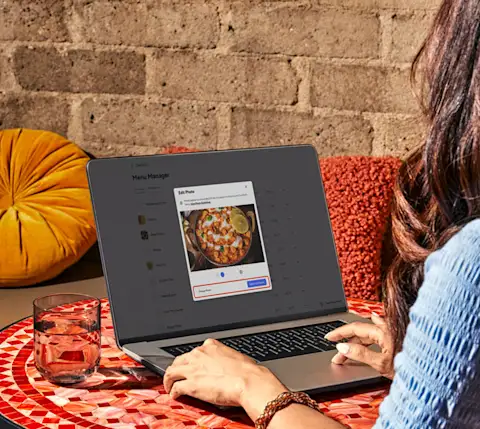
Manual delivery tracking, like POS receipts, handwritten notes, or driver reports, gives you a fragmented view of what's happening with your delivery business. The Merchant Portal replaces that with a single dashboard where you can see exactly when and where orders spike, how ratings trend over time, and which items drive the most revenue.
Key metrics to track
Order volume trends: Identify your busiest days for food delivery and dayparts so you can staff accordingly and target promotions at slow windows.
Average order value: If delivery orders aren't generating enough revenue after fees, audit your upsell prompts and bundle offers.
Customer ratings: A rating drop should be investigated, especially in terms of packaging, prep time, or food quality in transit.
Prep time accuracy: Consistent gaps between estimated and actual prep times push out delivery estimates and affect your ratings directly.
Menu item performance: Use order history to identify which dishes drive delivery revenue and which to cut from your delivery menu over time.
New vs. repeat customer behavior
Repeat customers place larger orders and generate fewer support issues than first-time customers, making that first delivery order one of the most important to get right. Use the cohort data in your Merchant Portal to monitor the success of your retention efforts.
6 common delivery setup mistakes (and how to avoid them)
Even well-run restaurants make avoidable mistakes when they first launch delivery. Here are the six most common, and what to do instead.
1. Setting prep times too optimistically
Short prep time estimates create a ripple effect: Dashers wait, delivery windows slip, and customers receive food that's past its prime.
The fix: Add a five-minute buffer to your realistic estimate and tighten from there as real order data comes in.
2. Launching with your full menu
Offering every menu item on day one puts unnecessary pressure on your kitchen and increases error rates before your team has found its delivery rhythm.
The fix: Start with 15–20 of your most operationally simple items and expand gradually as volume and confidence build.
3. Underinvesting in packaging
Inadequate packaging is one of the most common sources of negative delivery reviews. Food arrives in poor condition, and customers hold the restaurant responsible regardless of who handled the delivery.
The fix: Refer back to the equipment section for a full packaging checklist.
4. Skipping a dedicated pickup station
When delivery orders share space with dine-in operations, the result is confusion for your team and delays for Dashers.
The fix: A clearly marked, organized pickup zone should solve the problem.
5. Waiting for complaints instead of monitoring quality proactively
Most customers who receive a bad delivery order don't complain — they just don't reorder. By the time a pattern shows up in your ratings, you've already lost customers you didn't know were at risk.
The fix: Taste-test your own delivery orders weekly, check ratings and reviews daily in your Merchant Portal, and look for patterns before they become a trend.
6. Underpricing to stay competitive
Matching your dine-in prices on delivery feels safe, but commission fees can turn profitable dishes into break-even orders without you noticing.
The fix: Take time to calculate true profitability per item after commission.
Get started with DoorDash delivery services
The restaurants that grow fastest on delivery focus on food quality and profitability while leaning on platforms that handle logistics and customer acquisition.
DoorDash Marketplace gives you instant access to 37M+ active consumers and a nationwide Dasher network from day one.
Launch fast: Most restaurants are live within a week, with no lengthy contracts or upfront fees.
Grow your revenue: Reach new customers who wouldn't have found you otherwise, and turn first-time delivery orders into repeat business over time.
Manage everything in one place: The Merchant Portal gives you real-time data on orders, ratings, and performance so you can make informed decisions as you grow.
Sign up as a DoorDash Merchant and start reaching more customers today.
Already delivering with your own drivers? DoorDash Self-Delivery lets you access the DoorDash customer base at a reduced commission while keeping your existing delivery operation in place.