What are Sponsored Listings and how do they work?
Sponsored Listings are ads that help more local customers see and order from your business on DoorDash.
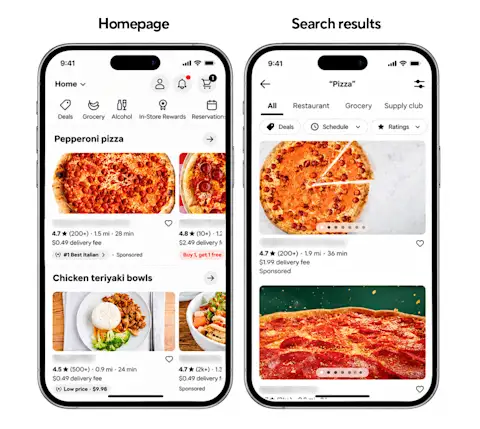
Your ad appears in high-traffic areas like the DoorDash homepage and relevant search results, with a “Sponsored” label.
What are the benefits of Sponsored Listings?
Get seen by more customers
Show up where customers are already looking, like the homepage and the top of relevant search results, so more people find your business when they're deciding what to order.
Pay for orders, not clicks
Unlike other platforms, you only pay when your campaign works. Not when customers see your ad. Not when they click. Only when they place an order from your ad.
Grow your DoorDash sales
On average, businesses earn $6 for every $1 spent on ads over one month, and more than 45% of orders from ads on DoorDash come from new customers.*
When should I use Sponsored Listings?
You want to reach more customers and grow sales. Help more customers discover your business across all your stores and turn that discovery into more orders.
You want to stand out from local competition. Stay competitive with other local businesses by helping customers see you first.
Mi Vida, a Mexican restaurant with three locations in Washington, D.C., keeps its Sponsored Listings running all the time to stay competitive with the restaurants around it.
You're new to DoorDash or just opened a new location. Help customers find you from day one, before you've built up reviews and regulars.
When The Melt opened its newest location in San Diego, its Sponsored Listing brought in about 500 new customers and more than $13,000 in sales in under two months.
See Sponsored Listings in action
Farmhouse Kitchen, a Northern Thai restaurant with locations across California and Oregon, runs Sponsored Listings for all of its stores. Since launching its campaign in August 2024, the restaurant has earned nearly $150,000 in sales from Sponsored Listings, a 6.17x return on ad spend.
“We see the numbers in DoorDash — how much we spend, how much we get in return. Once you see the numbers, it's clear that it's worth it.”
For The Melt, a California fast-casual chain, Sponsored Listings work like a billboard that only charges for results:
“For me, Sponsored Listings is like getting a billboard on the big highway DoorDash has built. It's like paying a guy to have a sign on the side of the road and only paying him money for anyone that comes to my restaurant and orders.”
How to create a Sponsored Listing on DoorDash
You can set up a Sponsored Listing from the Marketing section of your Merchant Portal. All your settings are on one page, with a preview of your ad and sales and cost estimates beside them.
1. Go to Advertise to customers
In the Merchant Portal, go to Marketing > Run a campaign, then select Create ad on the Advertise to customers card.

2. Choose your stores and audience
Select the stores you want to advertise, then choose your audience. To reach everyone within your business’s delivery radius, select All customers.

3. Set your duration and schedule
Choose when your campaign starts and which days and times your ad can appear. We recommend selecting Continuous, and you can pause or end your campaign at any time.
4. Set your average weekly budget
Choose how much you want to spend on average each week. As you adjust your budget, you'll see estimated weekly costs, sales, and return on ad spend.
5. Choose your bid strategy
Your bid is how much you’re willing to pay per order placed by customers. We recommend Automatic bidding, which lets DoorDash automatically set the most competitive bid for you.
6. Review expanded ad reach
To help more customers discover your business, we recommend opting in to expanded ad reach, which allows your ad to also appear on partner platforms using the same budget and with no extra setup.
7. Name your campaign and apply credits
Add a campaign name. If you have eligible Marketing Credits, turn them on in the Credits section. When you're ready, select Create campaign.

How to track your Sponsored Listing performance
Go to Marketing > Campaigns to see results for all your campaigns, then select your Sponsored Listing to see how it's doing. Your results tell a simple story: customers see your ad (impressions), place orders, those orders add up to sales, and your return on ad spend shows what you earned for what you spent.
Performance
Impressions: See how many times customers saw your ad.
Campaign sales, orders, and spend: See the sales and orders that came from your ad, along with how much you spent on your campaign.
Return on ad spend (ROAS): See how much you earned in sales for every $1 spent. For example, a ROAS of 5x means you earned $5 for every $1 spent.
Use the chart to see how your results change over time. Alongside Sales vs spend, you can switch to Orders or Impressions to see how many orders your ad brought in and how many times customers saw it.

Reorder rate
See how often customers reorder from you after they place an order from your Sponsored Listing. Reorder rate is available after 30 days of campaign activity, and you can view it for new or lapsed customers.

Long-term value
See how much customers spend after they place an order from your Sponsored Listing. The chart compares what it cost to bring in each customer with how much they've spent with you over 30, 60, and 90 days.

Get started with Sponsored Listings
Ready to stand out on DoorDash? Create a Sponsored Listing in your Merchant Portal.
*Average according to a DoorDash study of 15.7k merchants run by restaurant partners for 2 weeks in April 2023.